









Questions and answers
Your Quotes, Invoices, Job cards and other documents are produced from Word templates that contain merge fields. This article answers the questions that come up most often when editing them.
It is for whoever maintains your document templates.
Replace or add a template
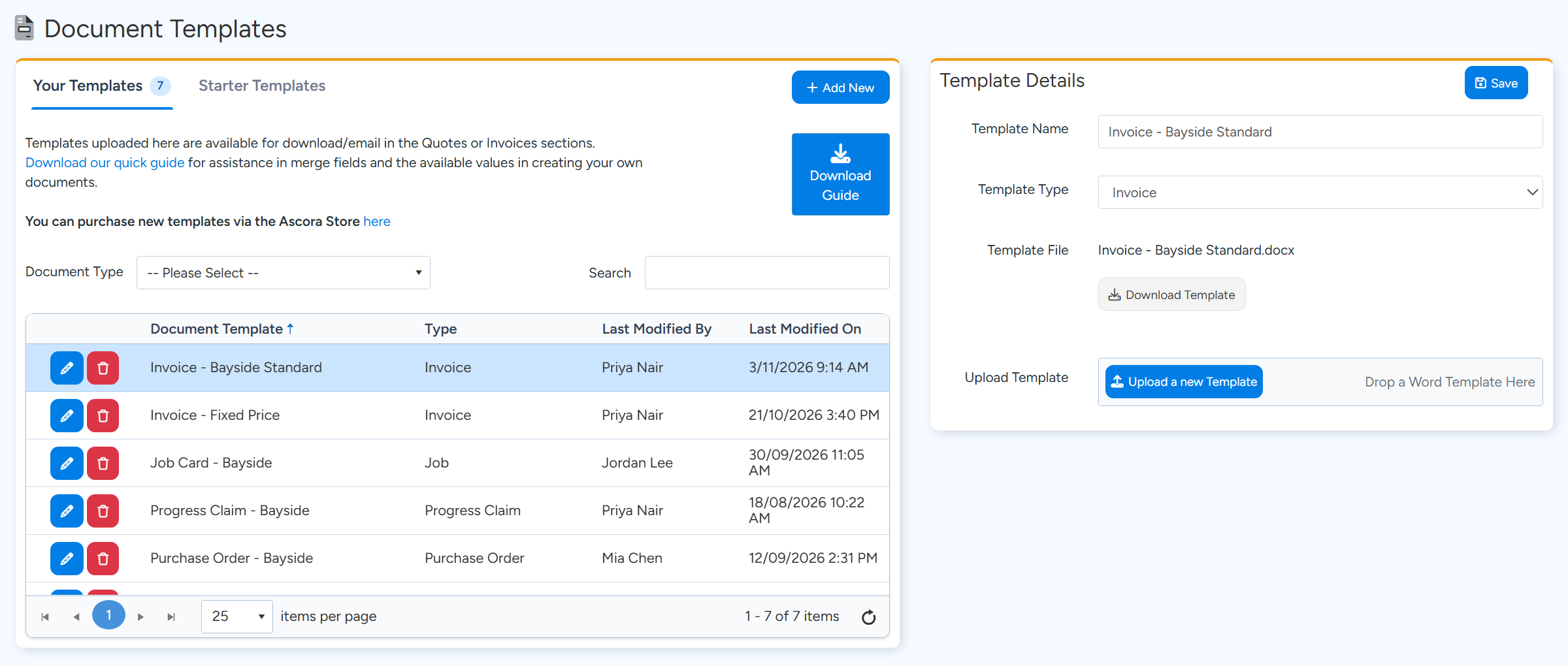
Go to Administration > Templates > Document Templates.
Your Templates lists the templates in your account. Starter Templates has ready-made ones you can add.
Select a template to see its details, download the Word file or upload a new .docx over it. Sample data. Select a template, or select Add New, enter a Template Name, choose the Template Type and save.
Select Download Template to get the current Word file, and edit it in Word.
Select Upload a new Template and choose the edited file.
The file must be a Word .docx file. Other file types, including .doc and .dotx, are refused and the upload shows as failed.
Tip
Download Guide on the same page gives the list of merge fields and what each one prints. Which template is used by default is not set here. It is set in the Quote settings and Invoice settings pages, under their default template boxes.
Company details
How do I print our legal name instead of our trading name?
CompanyName prints the Trading Name and CompanyLegalName prints the Legal Name. Both come from Administration > Company Details.
Sections on a Quote
How do I print each section with its own lines?
Put the section content between GroupStart:SectionDetails and GroupEnd:SectionDetails. The block repeats once for each section. Optional sections use OptionalSectionDetails.
Why are a section's inclusions and exclusions blank?
The tables Inclusion, Exclusion and Assumption print the ones entered on the Quote as a whole. Those entered on a section print only from SectionInclusion, SectionExclusion and SectionAssumption, and only inside the Section Details block.
Hiding parts that are empty
Can a heading and table disappear when there is nothing to print?
Yes, for content inside a group. A block between a GroupStart and its GroupEnd is left out when it has no rows, and empty paragraphs are removed. Put the heading inside the same group as its table.
Can I show text only when a section has labour or Supplies?
Inside Section Details, the fields HasLabour and HasSupplies give True or False, which you can test with a Word IF field.
Categories, Equipment and kits
Can a table show only the Supplies of one category?
No. Each Supply row has a Category field you can print. For a Quote grouped by category, use the template type Category-Based Quotation, which lists the Supplies under each category.
How do I print the Equipment on a Job?
Use the Equipment table, between TableStart:Equipment and TableEnd:Equipment, with fields such as Number and Name. There is no single field for it outside the table, because a Job can have several pieces of Equipment.
How do I show what is inside a kit?
A kit prints as one row of the Supply table. On Quote documents, KitSupplyDetail, KitSupplyDetailWithQty, KitLabourDetail and KitLabourDetailWithQty print its contents under that row. For Job documents, tick Explode Job Kits into Supplies and Labour in Job Settings to print each kit as its separate lines.
Getting help
Is there a preview before I use a template?
No. Download a Quote or Invoice with the template to check it.
Can Ascora build a template for us?
The Document Templates page has a link to buy a new template through the Ascora Store.