









To ensure your Ascora mobile app is up-to-date, follow these steps:
Go to Administration Then Users
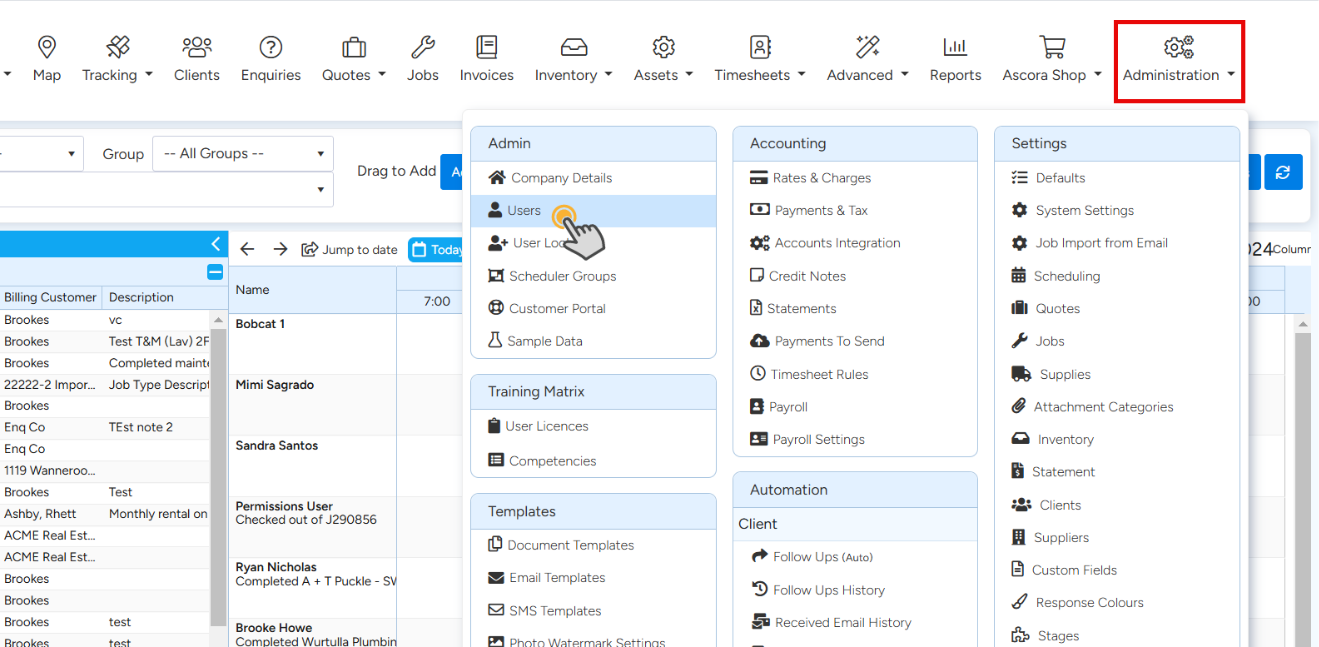
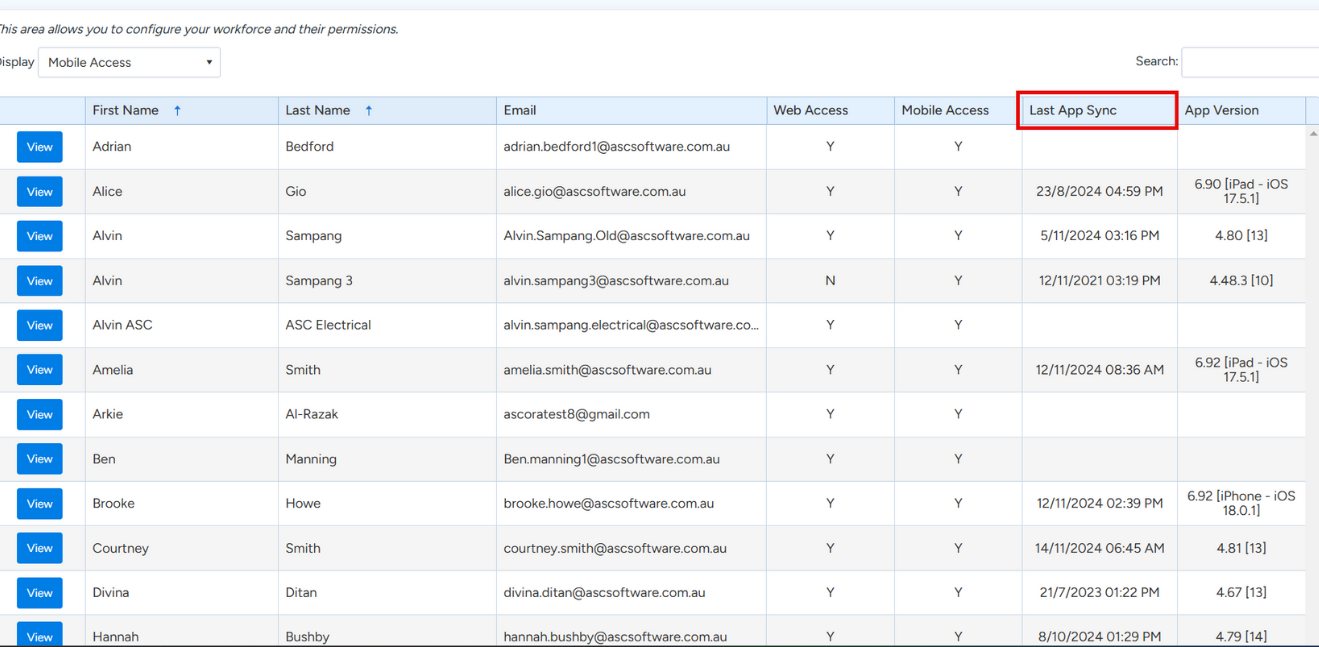
Adjust The Filter To Display Mobile Access

View The Last App Sync
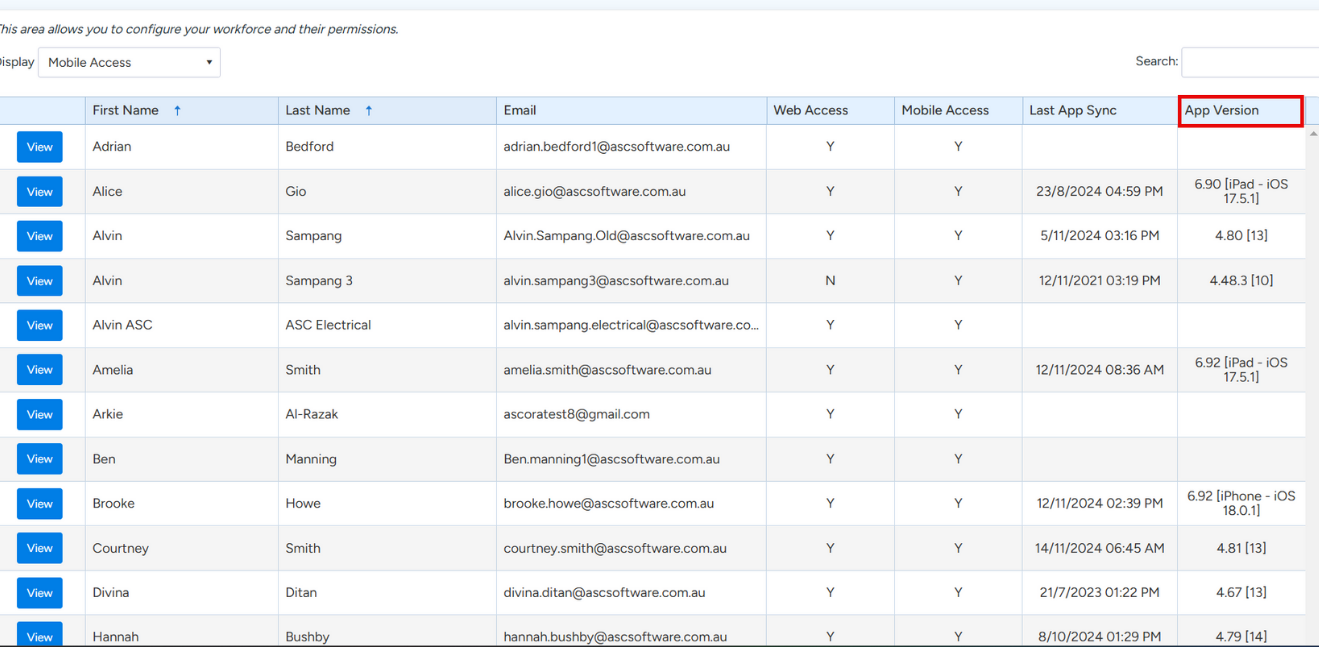
View The App Version
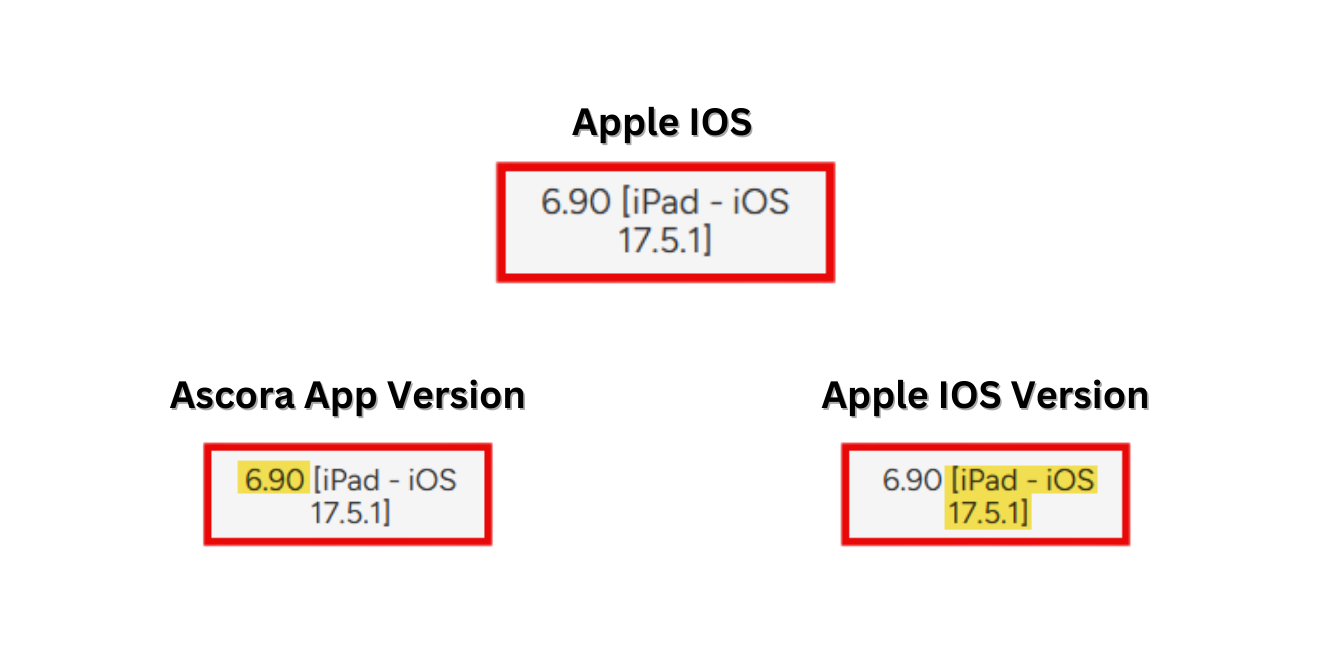
Note on the Numbering System
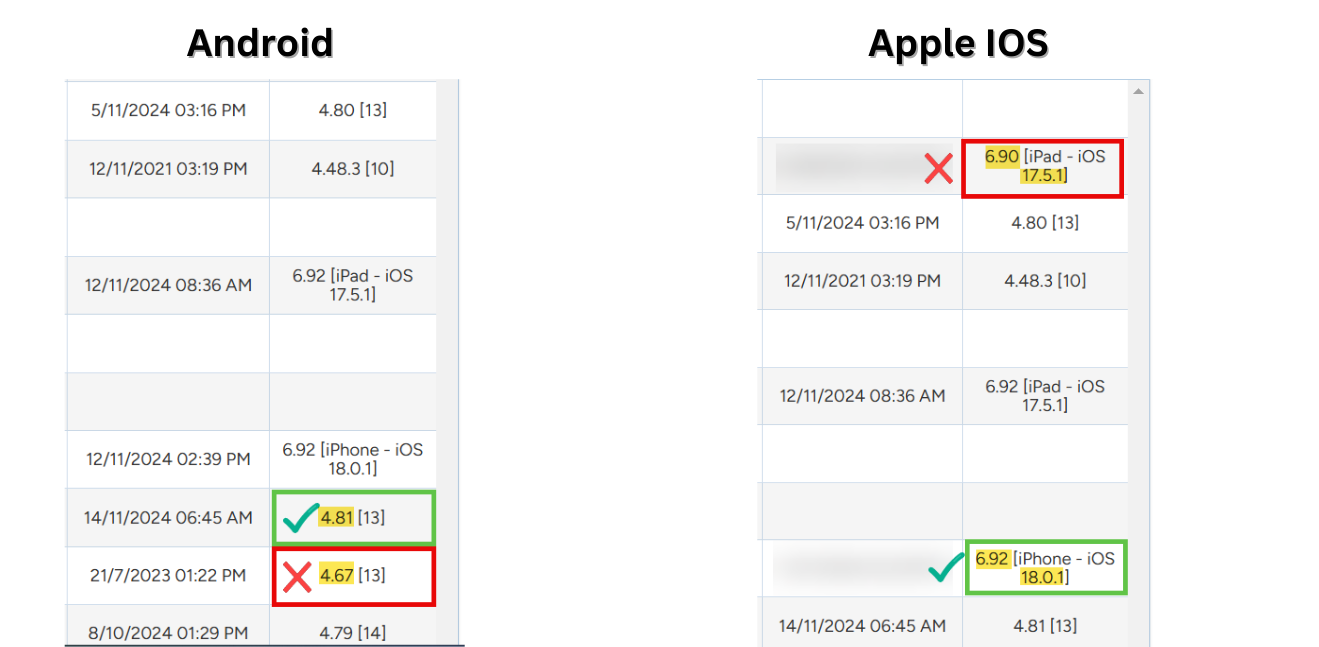
6.90 [iPad - iOS 17.5.1]
This is broken up into two parts:
- 6.90 = The Ascora App Version Number for iOS
- [iPad - iOS 17.5.1] = The Apple Device Version Number
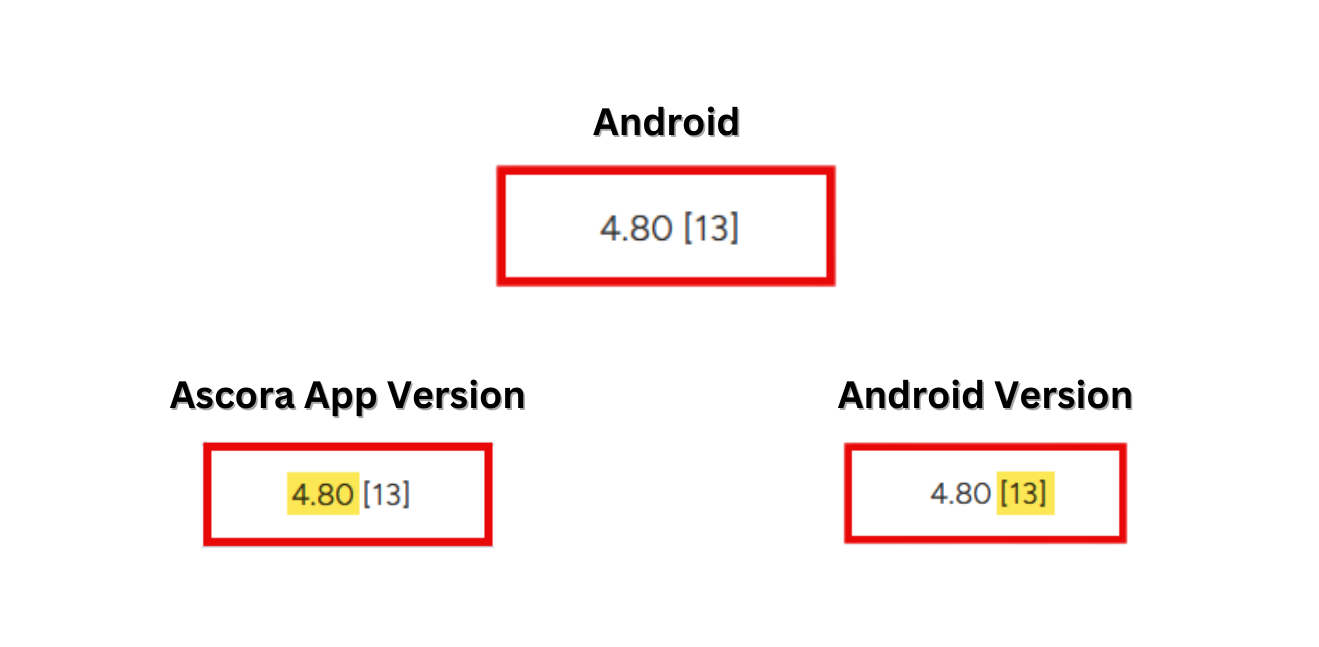
4.80 [13]
This is broken up into two parts:
- 4.80 = The Ascora Android Version Number
- [13] = The Android Device Version Number
Current Version as of
Ascora App
- iOS: 6.97
- Android: 4.83
As of January 24, 2025, the latest iOS version is 18.2.1, compatible with the following iPhone models:
- iPhone XR
- iPhone XS
- iPhone XS Max
- iPhone 11
- iPhone 11 Pro
- iPhone 11 Pro Max
- iPhone SE (2nd generation)
- iPhone SE (3rd generation)
- iPhone 12 mini
- iPhone 12
- iPhone 12 Pro
- iPhone 12 Pro Max
- iPhone 13 mini
- iPhone 13
- iPhone 13 Pro
- iPhone 13 Pro Max
- iPhone 14
- iPhone 14 Plus
- iPhone 14 Pro
- iPhone 14 Pro Max
- iPhone 15
- iPhone 15 Plus
- iPhone 15 Pro
- iPhone 15 Pro Max
- iPhone 16
- iPhone 16 Plus
- iPhone 16 Pro
- iPhone 16 Pro Max
For detailed information on compatible devices, please refer to Apple's official support page.
iPad Models Compatible with iPadOS 18.2.1
Here is a list of iPad models that are compatible with iPadOS 18:
- iPad mini (6th generation)
- iPad mini (A17 Pro)
- iPad (10th generation)
- iPad Air (4th generation)
- iPad Air (5th generation)
- iPad Air 11-inch (M2)
- iPad mini (5th generation)
- iPad (7th generation)
- iPad (8th generation)
- iPad (9th generation)
- iPad Air (3rd generation)
- iPad Air 13-inch (M2)
- iPad Pro 11-inch (1st generation)
- iPad Pro 11-inch (2nd generation)
- iPad Pro 11-inch (3rd generation)
- iPad Pro 11-inch (4th generation)
- iPad Pro 11-inch (M4)
- iPad Pro 12.9-inch (3rd generation)
- iPad Pro 12.9-inch (4th generation)
- iPad Pro 12.9-inch (5th generation)
- iPad Pro 12.9-inch (6th generation)
- iPad Pro 13-inch (M4)
These models are fully compatible with the latest iPadOS 18, offering access to the latest features and improvements.
Android Devices Compatiable with Android 15
Google Pixel Devices:
- Pixel 6, 6 Pro, 6a
- Pixel 7, 7 Pro, 7a
- Pixel 8, 8 Pro
- Pixel Fold
- Pixel Tablet
Samsung Devices:
- Galaxy S Series (S21 and newer)
- Galaxy Z Series (Z Fold 3 and newer)
- Galaxy A Series (A33 and newer)
- Galaxy M Series (M33 and newer)
- Galaxy F Series (F15 and newer)
- Galaxy Tab Series (Tab S8 and newer)
OnePlus Devices:
- OnePlus 10 Pro, 10T, 10R
- OnePlus 11, 11R
- OnePlus 12, 12R
- OnePlus Nord 3, Nord CE 3, Nord CE 3 Lite
- OnePlus Open
Xiaomi, Redmi, and POCO Devices:
- Xiaomi 12, 12 Pro, 12T, 12T Pro
- Xiaomi 13, 13 Pro, 13 Ultra, 13 Lite
- Xiaomi 14, 14 Pro, 14 Ultra
- Redmi Note 12 Series
- Redmi Note 13 Series
- POCO F5, F5 Pro
- POCO X6, X6 Pro
Other Manufacturers:
- Motorola: Edge 40, Edge 40 Pro, Razr 40, Razr 40 Ultra
- Nokia: XR21, X30, G60, G42
- Nothing: Phone (1), Phone (2)
- Oppo: Find X6, Find X6 Pro, Reno 10 Series
- Realme: GT 2, GT 2 Pro, GT Neo 3, 11 Pro Series
- Sony: Xperia 1 V, Xperia 5 V, Xperia 10 V
- Vivo: X90, X90 Pro, X90 Pro+, V29 Series
- iQOO: 11, 11 Pro, Neo 7 Series
Android Devices Compatiable with Android 14
Google Pixel Devices:
- Pixel 4a 5G
- Pixel 5
- Pixel 5a
- Pixel 6, 6 Pro, 6a
- Pixel 7, 7 Pro, 7a
- Pixel Fold
- Pixel Tablet
- Pixel 8, 8 Pro (shipped with Android 14)
Samsung Devices:
- Galaxy S Series: S21, S21+, S21 Ultra, S21 FE, S22, S22+, S22 Ultra, S23, S23+, S23 Ultra
- Galaxy Z Series: Z Fold 3, Z Fold 4, Z Fold 5, Z Flip 3, Z Flip 4, Z Flip 5
- Galaxy A Series: A33, A34, A53, A54, A73
- Galaxy M Series: M33, M53, M54
- Galaxy Tab Series: Tab S7 FE, Tab S8, Tab S8+, Tab S8 Ultra, Tab S9, Tab S9+, Tab S9 Ultra
OnePlus Devices:
- OnePlus 8T
- OnePlus 9, 9 Pro, 9R, 9RT
- OnePlus 10 Pro, 10R, 10T
- OnePlus 11, 11R
- OnePlus Nord 2T, Nord CE 2 Lite
- OnePlus Open
Xiaomi and Redmi Devices:
- Xiaomi 12, 12 Pro, 12T, 12T Pro, 12S, 12S Pro, 12S Ultra, 12 Lite
- Xiaomi 13, 13 Pro, 13 Ultra, 13 Lite
- Xiaomi Mix Fold 2
- Xiaomi Pad 6, 6 Pro
- Redmi Note 11R, 11T Pro, 11T Pro+
- Redmi Note 12, 12 Pro, 12 Pro+, 12 Pro Speed, 12S, 12 Turbo
- Redmi K50, K50 Pro, K50 Gaming, K50i, K50 Ultra
- Redmi K60, K60E, K60 Pro
Motorola Devices:
- Motorola Razr 40, Razr 40 Ultra, Razr 2022
- Motorola Edge+ (2023), Edge (2023), Edge (2022)
- Motorola Edge 40 Pro, Edge 40 Neo, Edge 40
- Motorola Edge 30 Ultra, Edge 30 Pro, Edge 30 Neo, Edge 30 Fusion
- Moto G (2023), G Stylus 5G (2023), G Stylus (2023), G Power 5G
- Moto G84, G54, G73, G53, G23, G14
Other Manufacturers:
- Nothing: Phone 1, Phone 2
- Realme: GT 2, GT 2 Pro, GT Neo 3, GT Neo 3 150W, 11 Pro, 11 Pro+, Narzo 60, Narzo 60 Pro, GT Neo 3T, C55, 10, 10 Pro, 10 Pro+, Narzo N55, 11, 11X, 9, 9 5G, 9i, 9 Pro, 9 Pro+, GT, Narzo 60X, Narzo 50, Narzo 50 Pro, C53, C51, Narzo N53
- Sony: Xperia 1 V, Xperia 10 V, Xperia 5 V, Xperia 5 IV, Xperia 1 IV, Xperia 10 IV
- Asus: ROG Phone 7, 7 Ultimate, ROG Phone 6, 6 Pro, 6D, 6D Ultimate, Zenfone 9, Zenfone 10
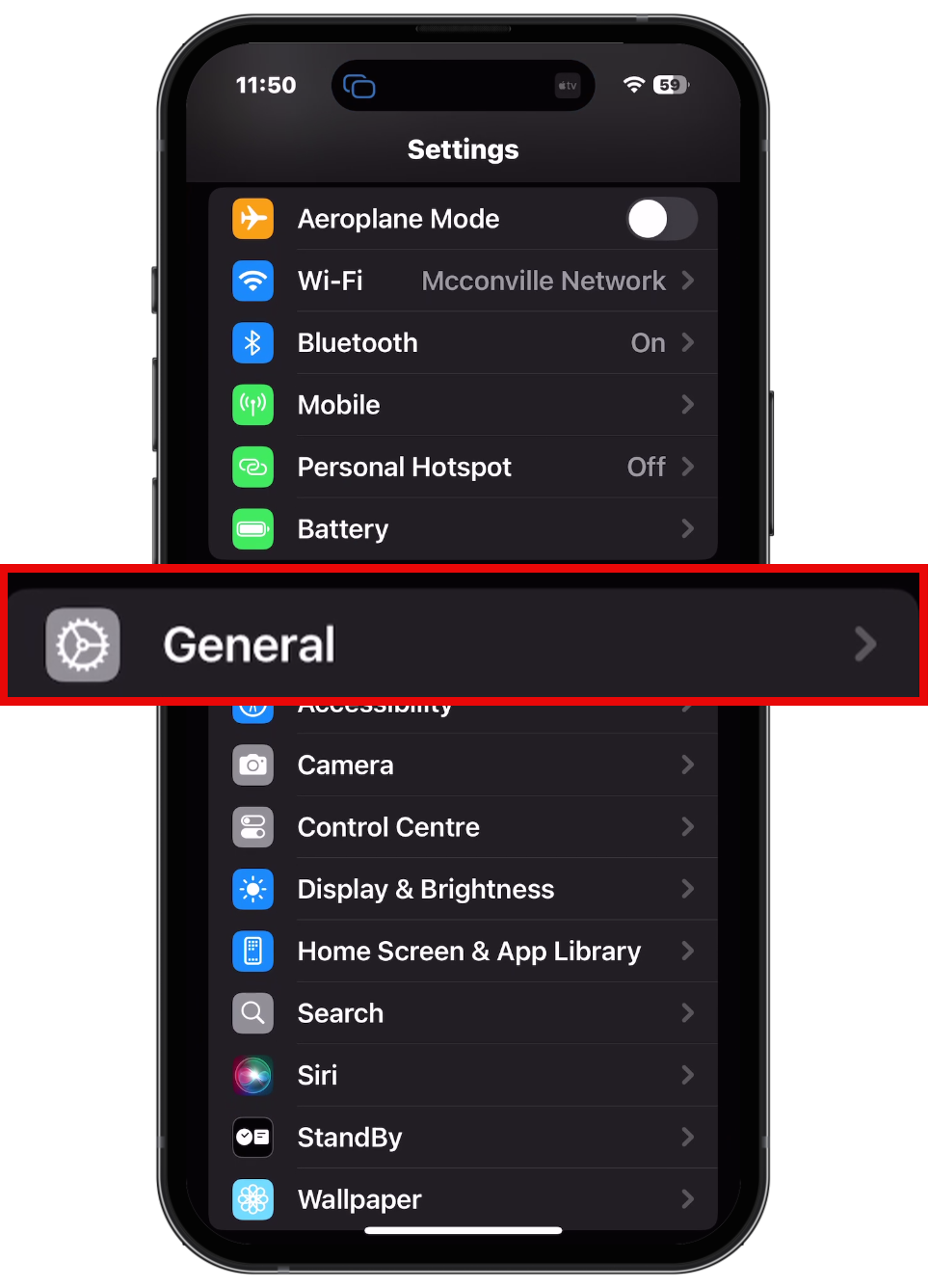
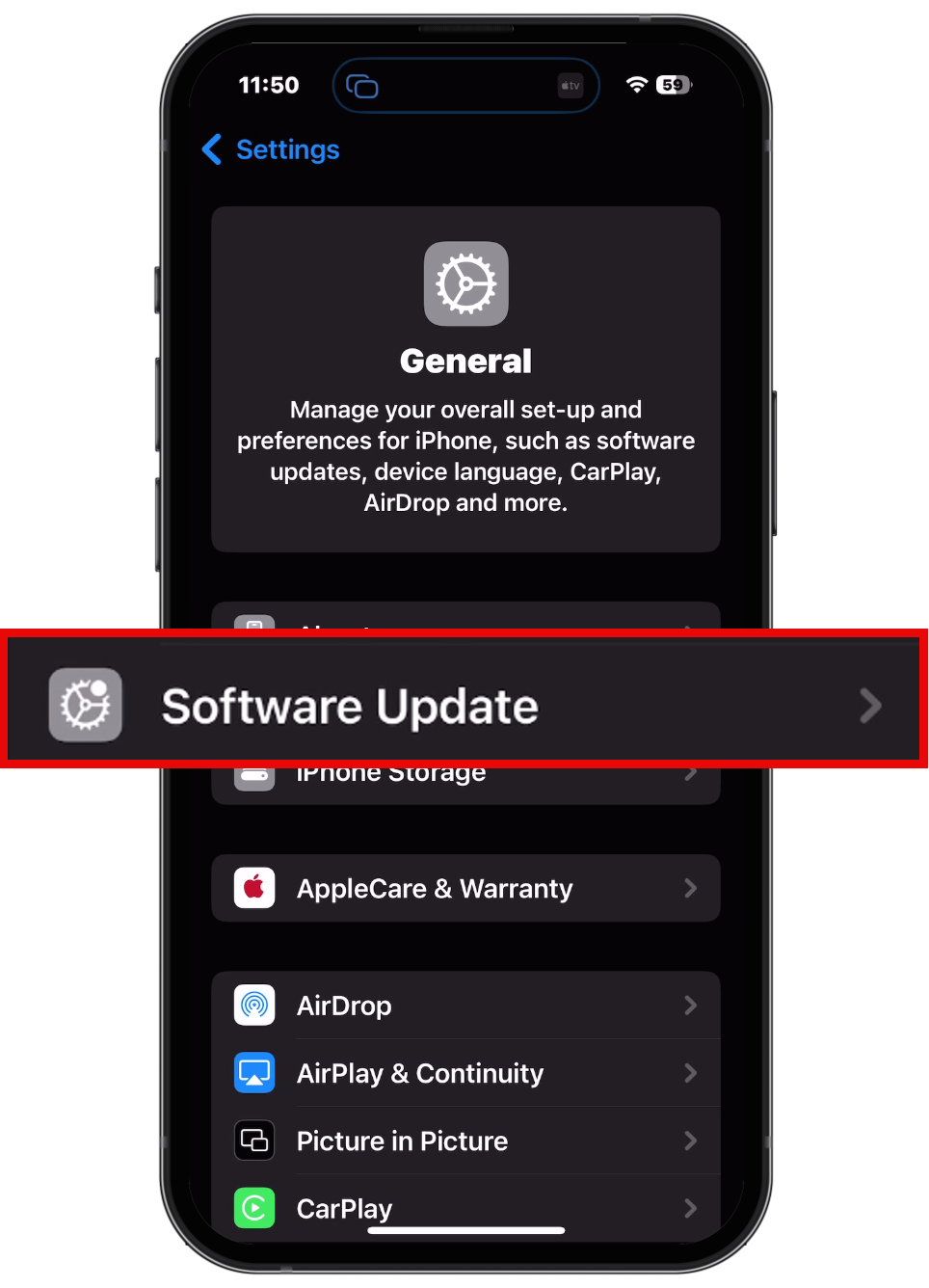
How to Update IOS On Iphone
Go to settings Then General
Software Update
Sub Pages
Got a question?
Submit an Idea
💡 Go to Ideas Portal